
Cloud ERP Built for business in Indonesia
Your whole operation, in one flow.
Opernix™ is a cloud ERP for companies in Indonesia. Sales, purchasing, inventory, production, finance and tax live in one place: a delivery reduces stock, an invoice creates the receivable, and every confirmed document posts its own journal entry.
- Indonesian & English interface
- PPN (VAT), e-Faktur & Coretax
- A separate database per customer
Built around Indonesian regulations and business practice
- PPN (VAT) & e-Faktur
- e-Bupot
- Coretax XML export
- PPh 21 TER & BPJS
- Multi-branch
- Rupiah & foreign currency
Stop reconciling. Start managing.
As a business grows, spreadsheets and disconnected apps start holding it back. Opernix connects the flow, so every figure you see comes from the same transactions.
Data spread across spreadsheets
Sales, warehouse and finance work in one system on the same master data. No more manual reconciliation between departments.
System stock does not match the warehouse
Every delivery, receipt, transfer and adjustment moves stock per warehouse and location, with lots, serial numbers and stock counts.
Month-end close takes too long
Journal entries are created from documents automatically. The Period Close Checklist shows what is still open before a period is locked.
Tax data is keyed in twice
Output and input tax invoices and withholding slips are created from transactions, ready to export in the Coretax import format.
Approvals by chat, with no trail
An Approval Matrix per document type, amount and condition. Who requested and who approved is recorded on the document.
Branch performance is hard to compare
Every journal entry carries a branch. Income Statement, Balance Sheet and Trial Balance run per branch and always balance.
See how Opernix works
Real screenshots from the application, with demo company data. The app interface shown is in English; it is also available in Indonesian.
Sales
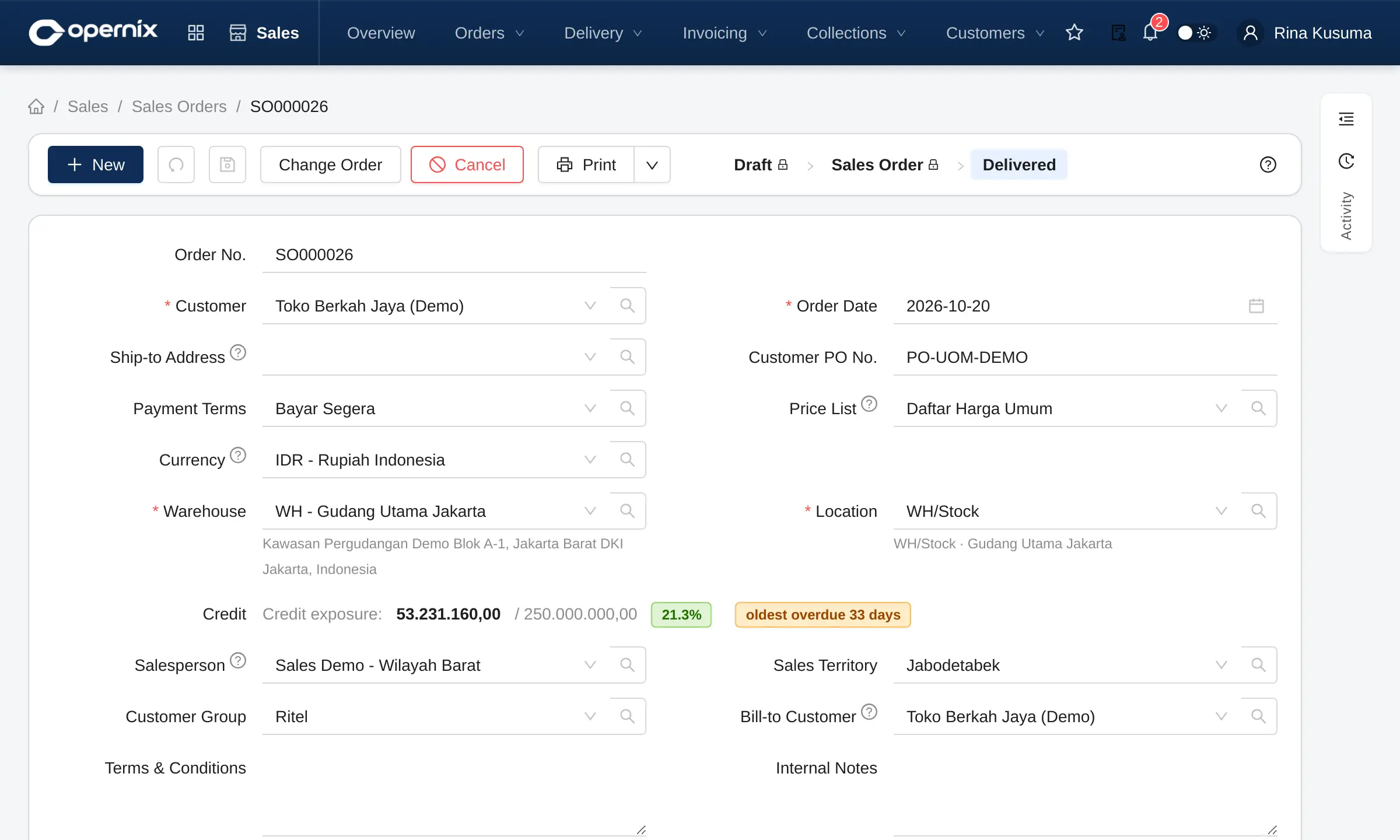
Orders that know the customer’s credit limit
A sales order shows credit exposure, the price list and stock availability before it is confirmed.
- Draft first, then Confirm: stock and journals only move after that
- Quotations, contracts, down payments and billing terms in one flow
- Deliveries and invoices are created straight from the order
Inventory
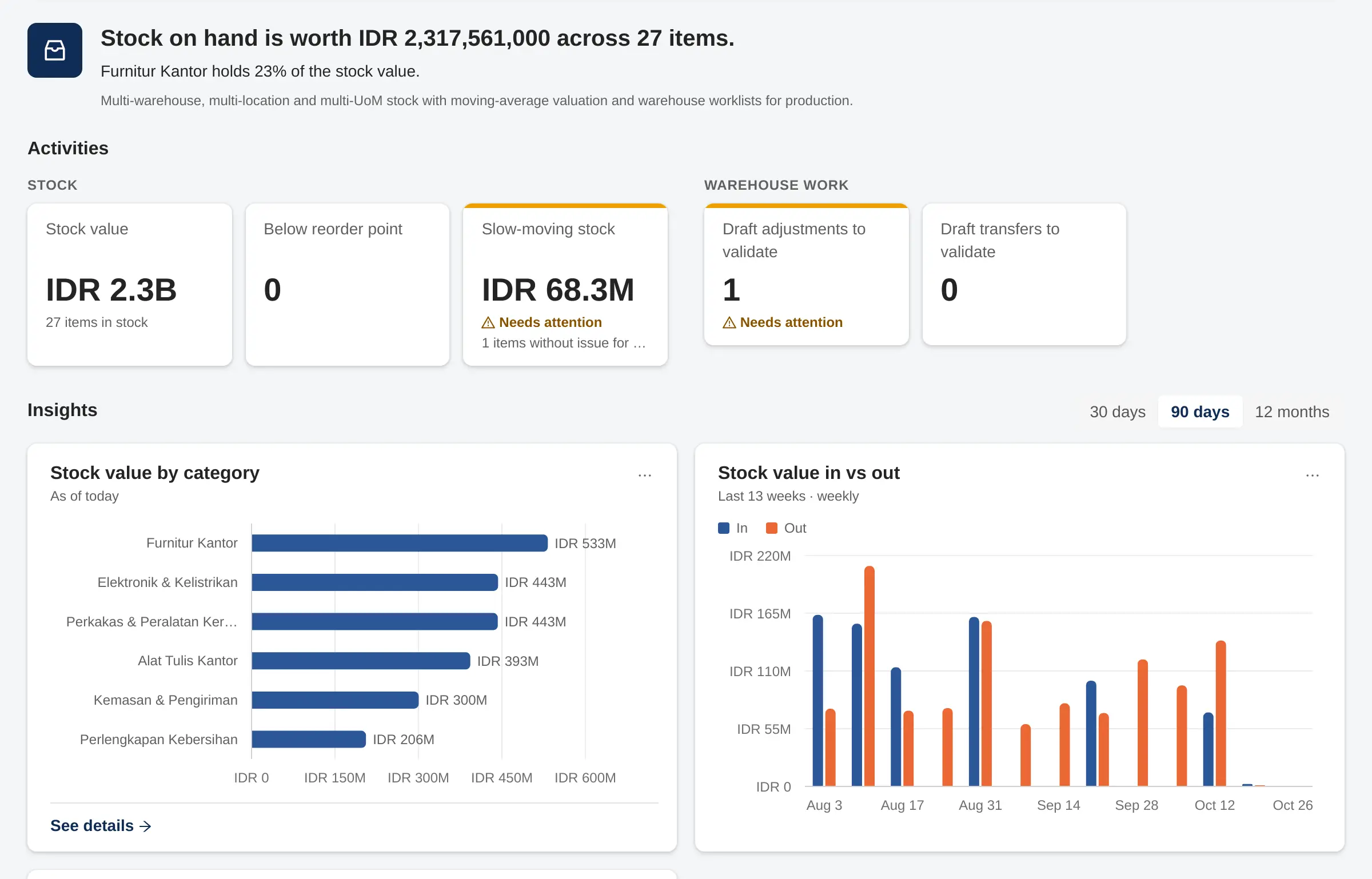
Stock per warehouse you can trust
Every delivery, receipt and transfer moves stock per warehouse and location immediately.
- On hand, reserved, incoming and projected on one screen
- Lots, serial numbers, consignment and stock counts
- Inventory value always in line with the general ledger
Production
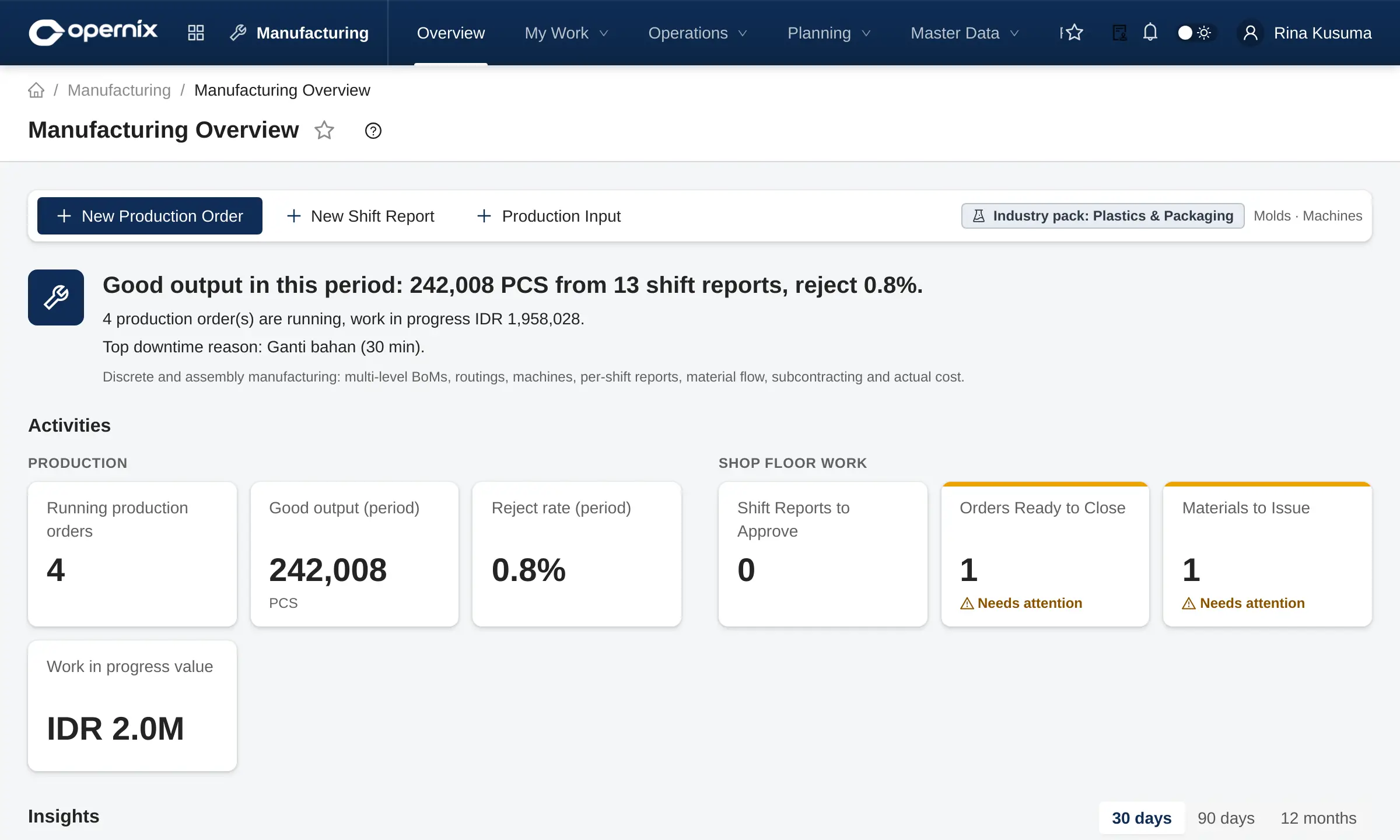
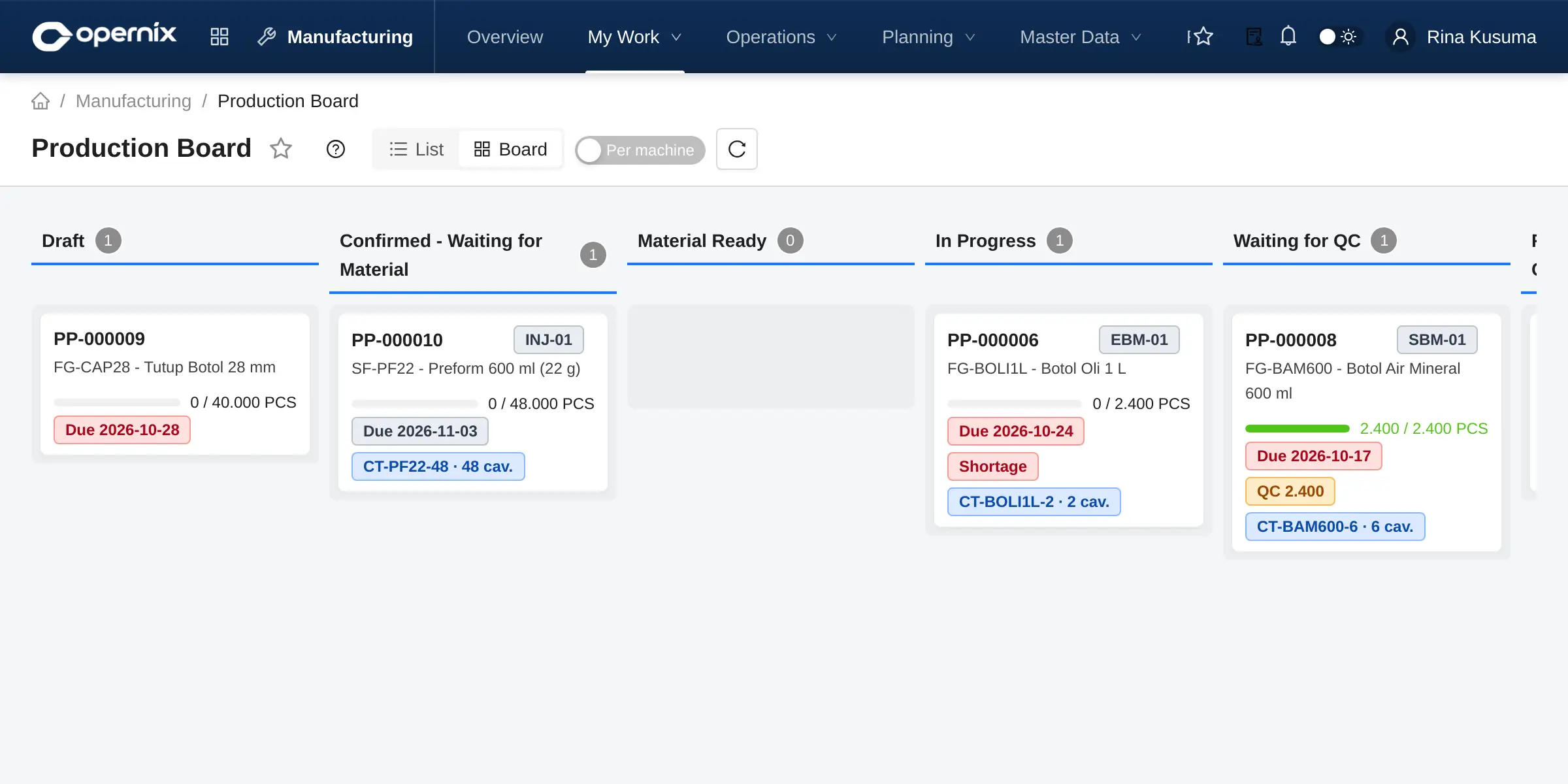
The shop floor on a single board
The production board shows every production order by stage, from draft to ready for handover.
- Material shortages and the QC queue are visible on each card
- Output per machine and shift through shift production reports
- Actual costs flow into inventory
Finance
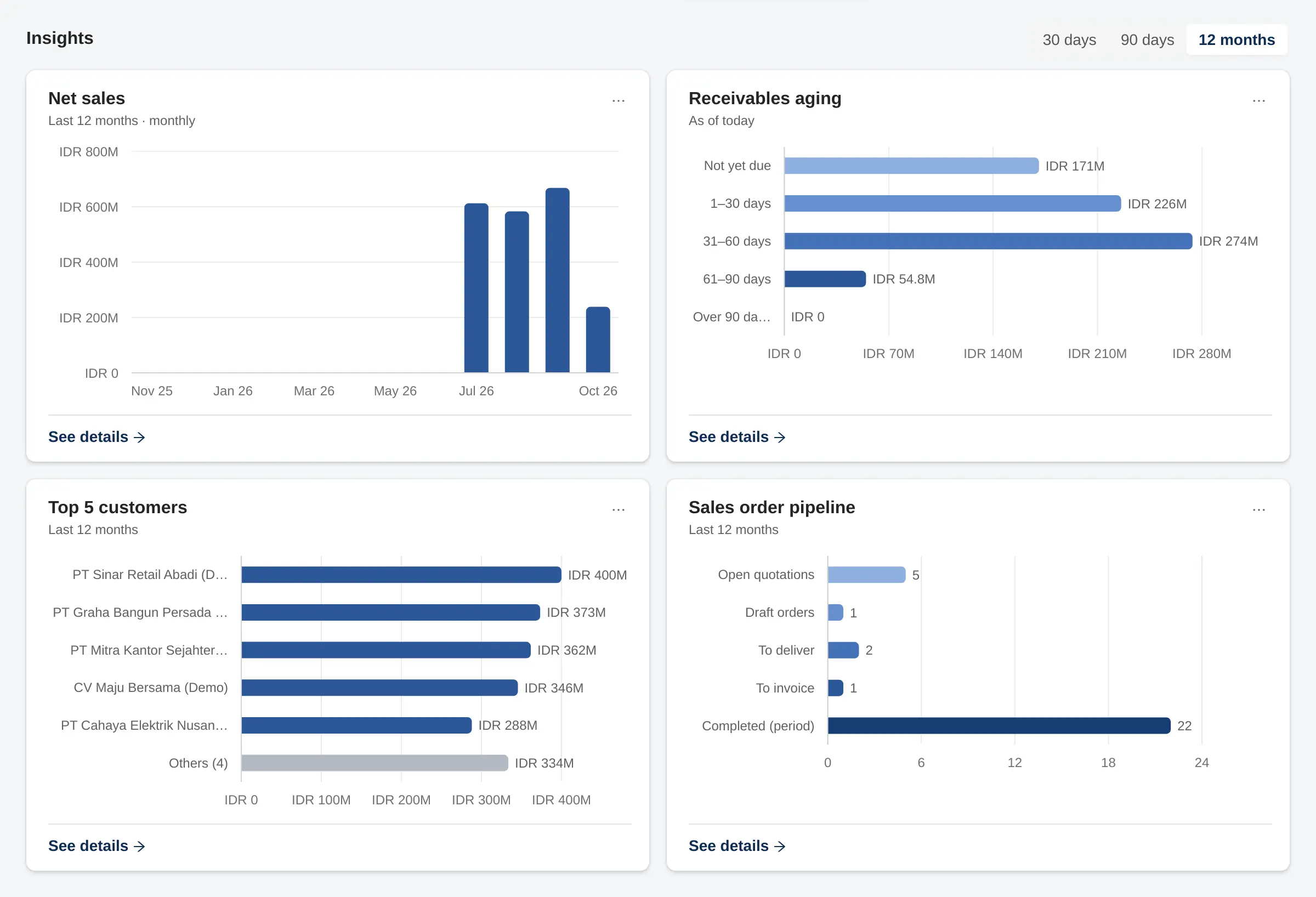
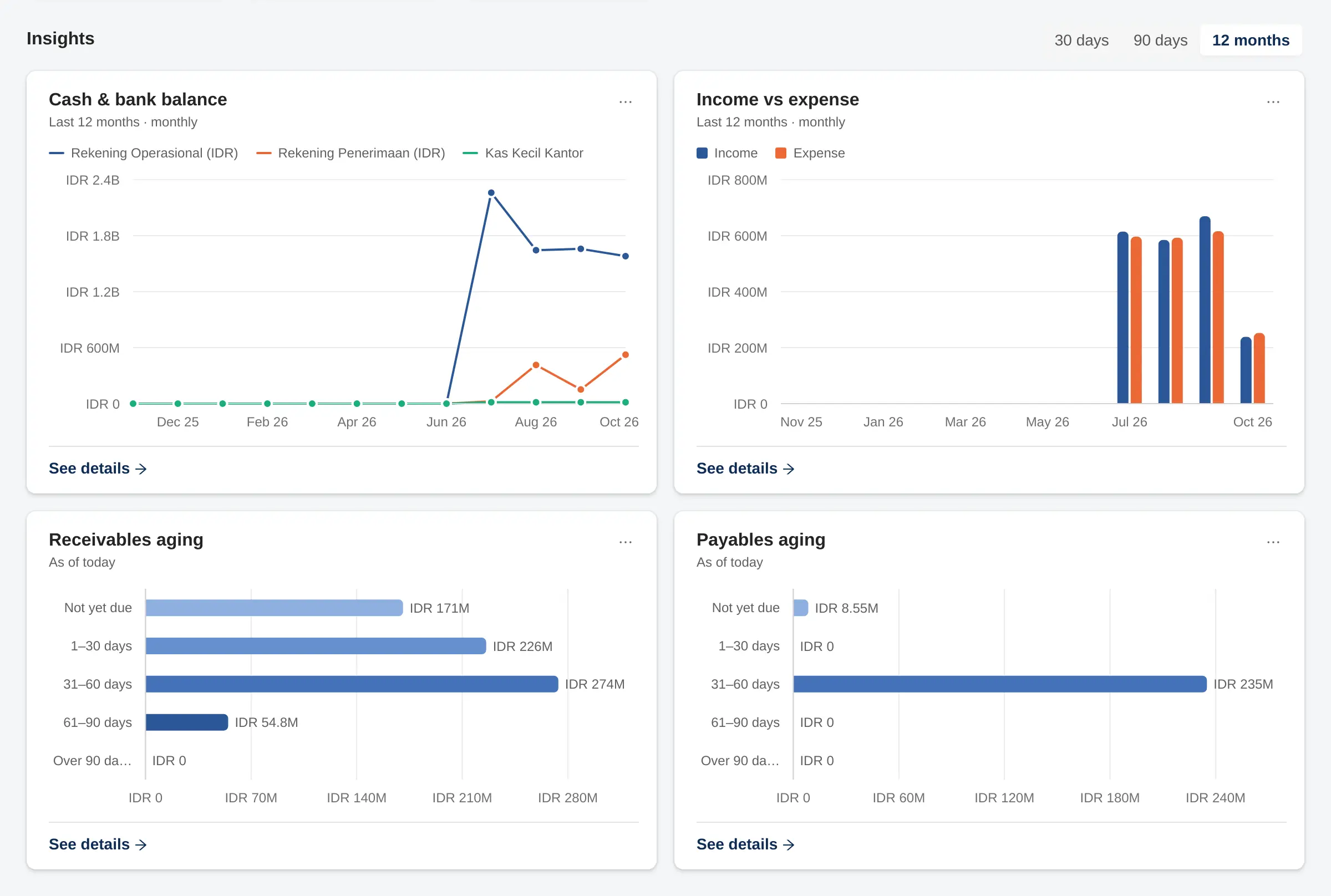
Financial statements straight from the ledger
Balance Sheet, Income Statement and Cash Flow are built from journal entries that every document posts automatically, and they always balance.
- Filter by branch and compare with prior periods or budget
- Click any figure to drill down to the general ledger
- Custom report designer, Excel and PDF export
Tax
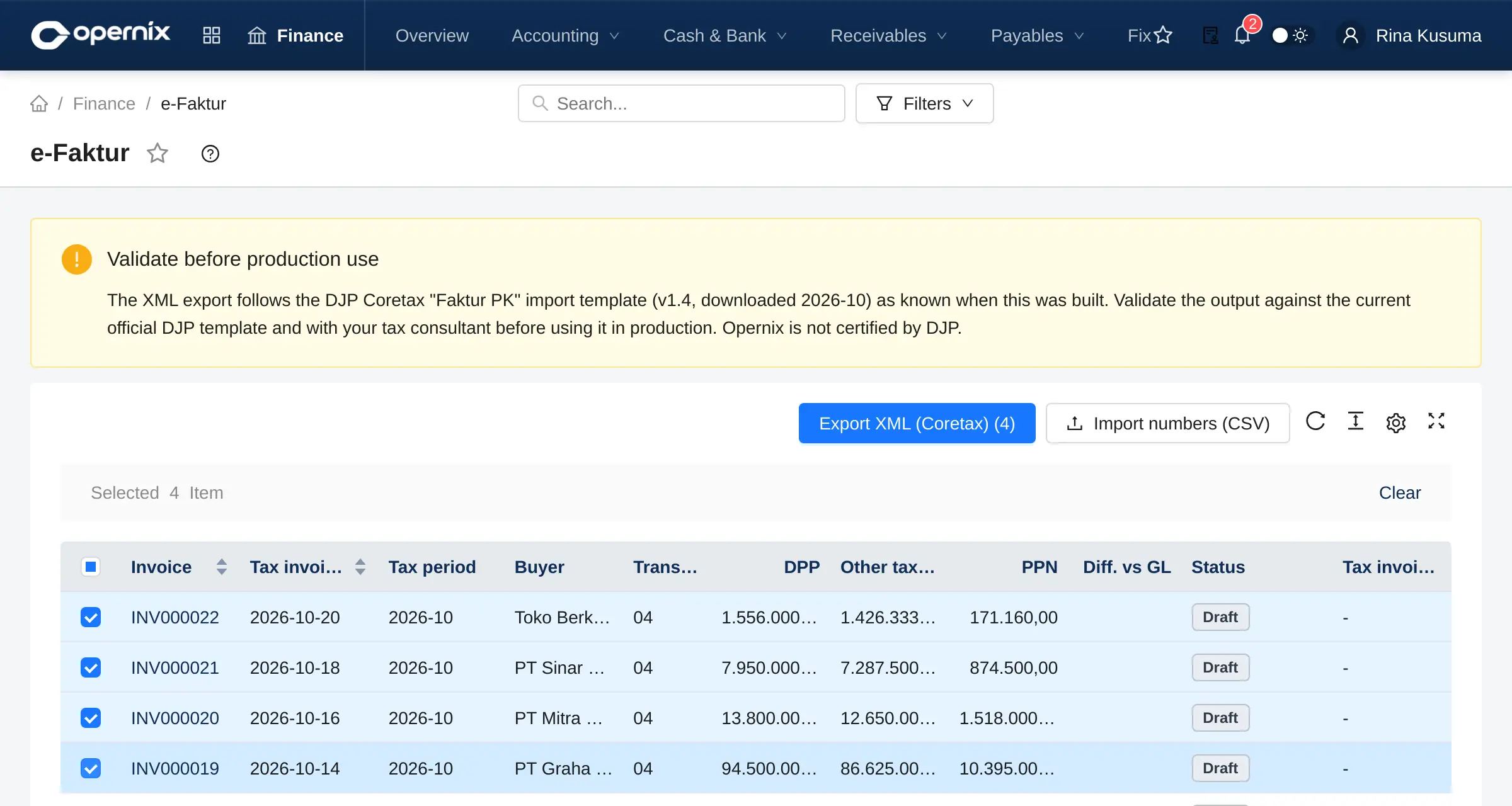
Tax invoices created from transactions
Every confirmed sales invoice with PPN (VAT) produces an e-Faktur tax invoice, ready to export in the Coretax import format.
- e-Faktur, input tax invoices and e-Bupot withholding slips
- Income tax recap reconciled with account balances
- Coretax PJAP add-on to submit and track status
Every part of the business, connected
Start with the core modules and add more when you need them. Add-ons are enabled per company, with no migration to another system.
Finance
- General ledger, receivables & payables
- Cash & bank, bank statements
- Fixed assets & depreciation
- Period close & financial reports
Sales
- Quotations, orders, contracts
- Deliveries, invoices, returns
- Down payments & billing terms
- Credit control & collections
Purchasing
- Requisitions & RFQs
- Purchase orders with budget control
- Goods receipts & three-way match
- Landed costs
Inventory
- Warehouses & locations
- Lots and serial numbers
- Consignment
- Stock counts & stock cards
Manufacturing
- Multi-level BoMs & routings
- MRP & production orders
- Shift production reports
- Quality control & actual costing
Indonesian tax
- PPN (VAT) & e-Faktur
- e-Bupot & income tax recap
- Coretax XML export
- Fiscal depreciation
Add-ons
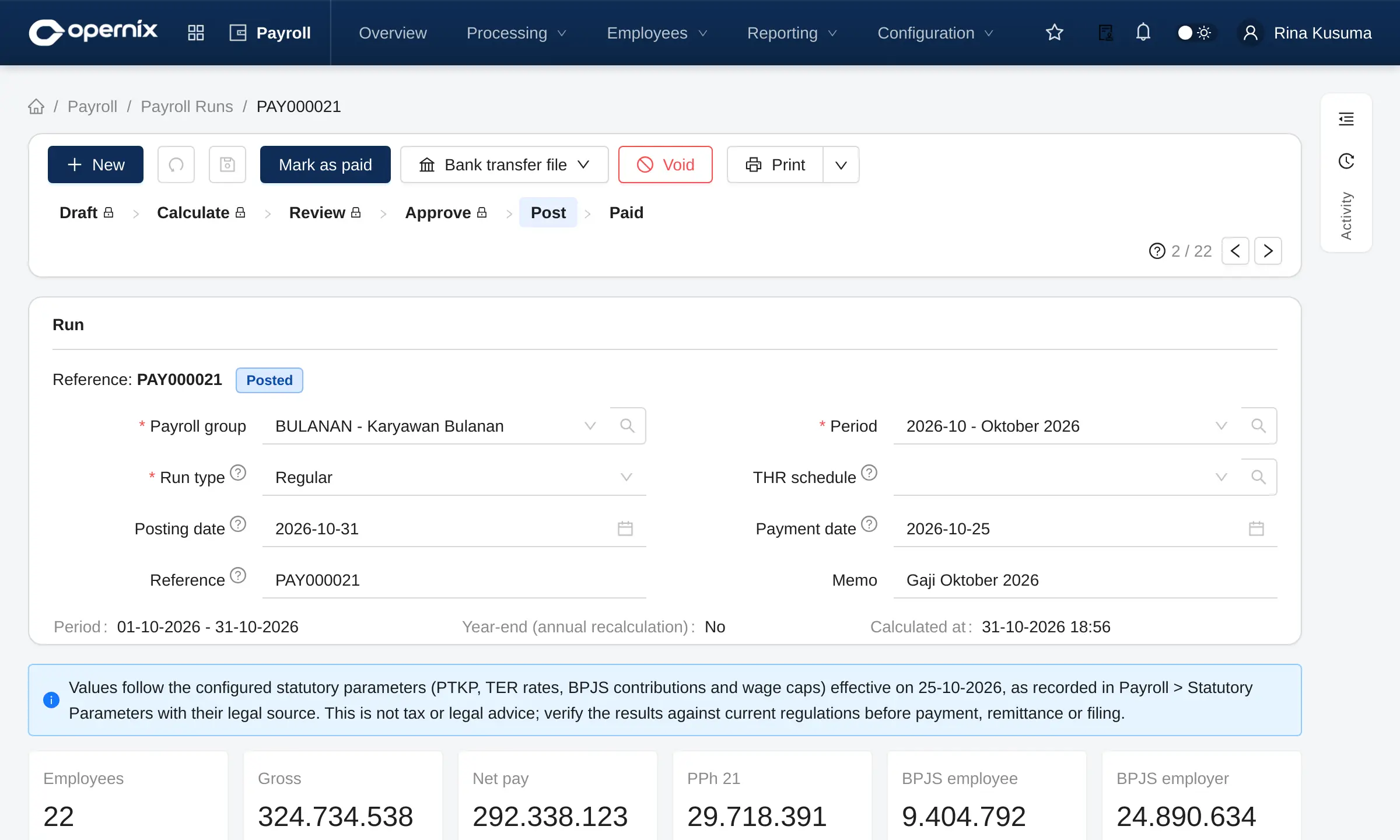
- HR & PayrollPPh 21 TER, BPJS, THR, payslips, attendance & shifts, employee self-service
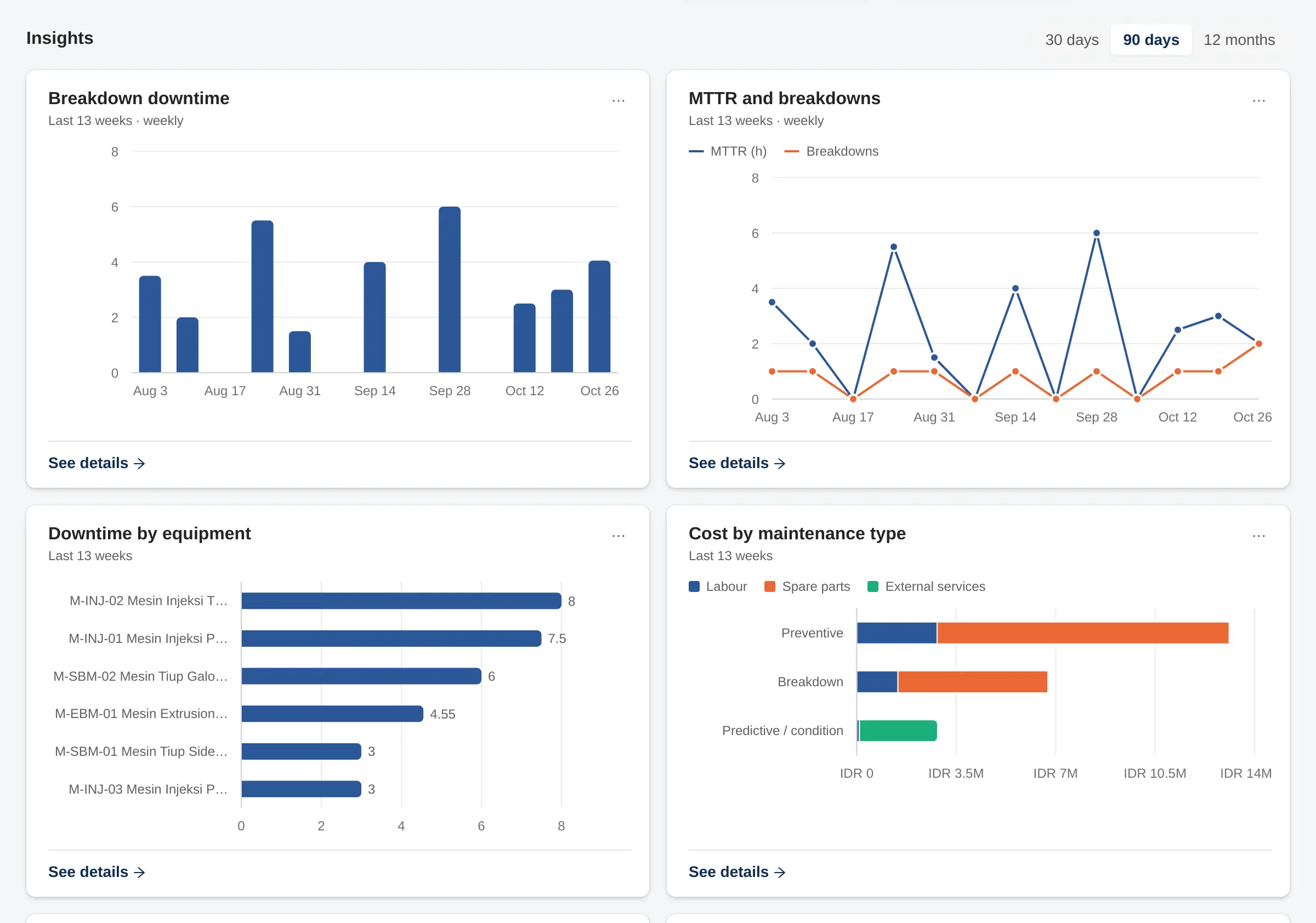
- Maintenance (CMMS)Equipment, work orders, preventive maintenance, MTTR/MTBF
- Coretax PJAPSubmit tax invoices and withholding slips through your PJAP partner
- Automatic bank feedsScheduled statement import (SNAP BI or an aggregator)
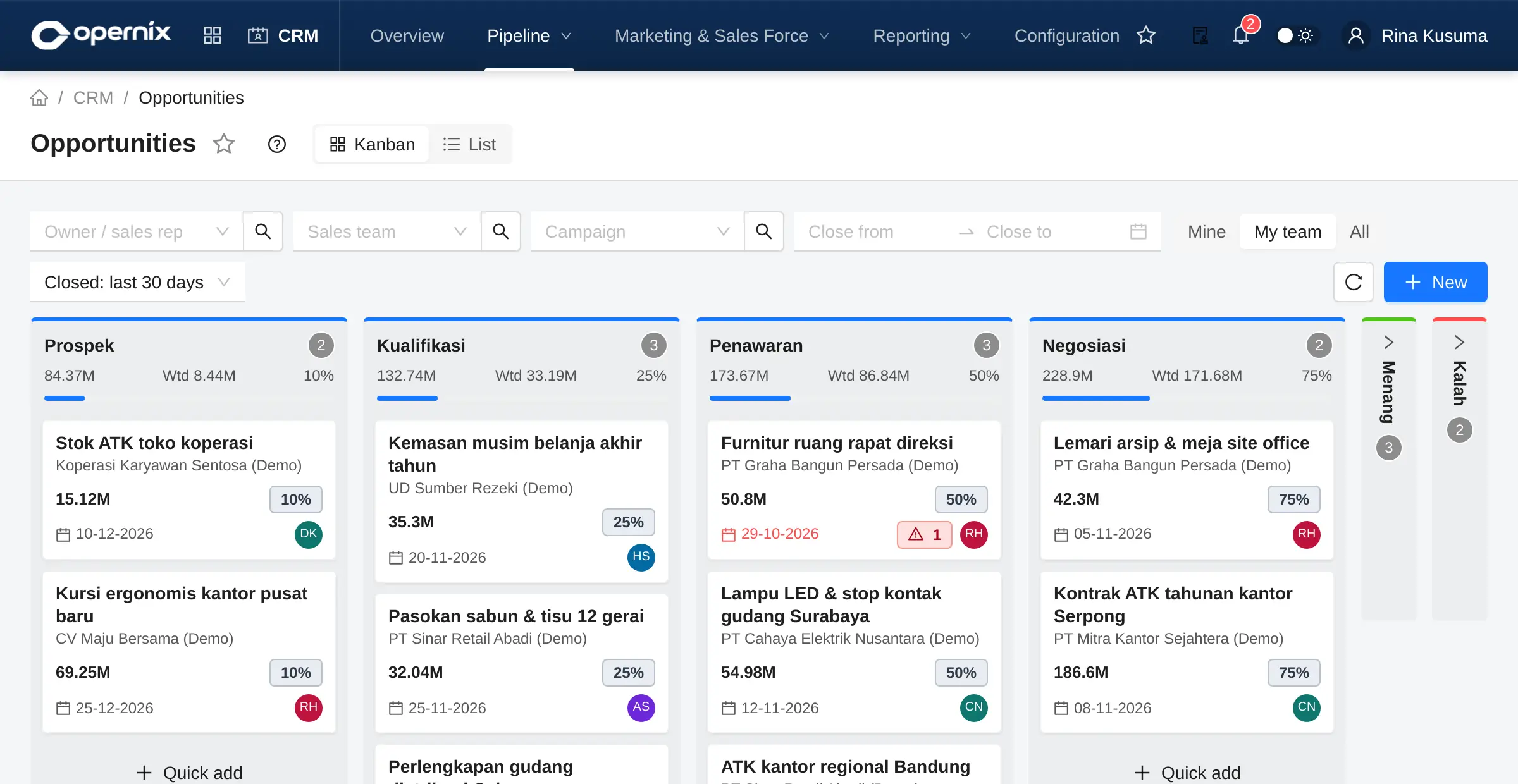
- CRMLeads, Kanban pipeline, activities, campaigns, agent commissions
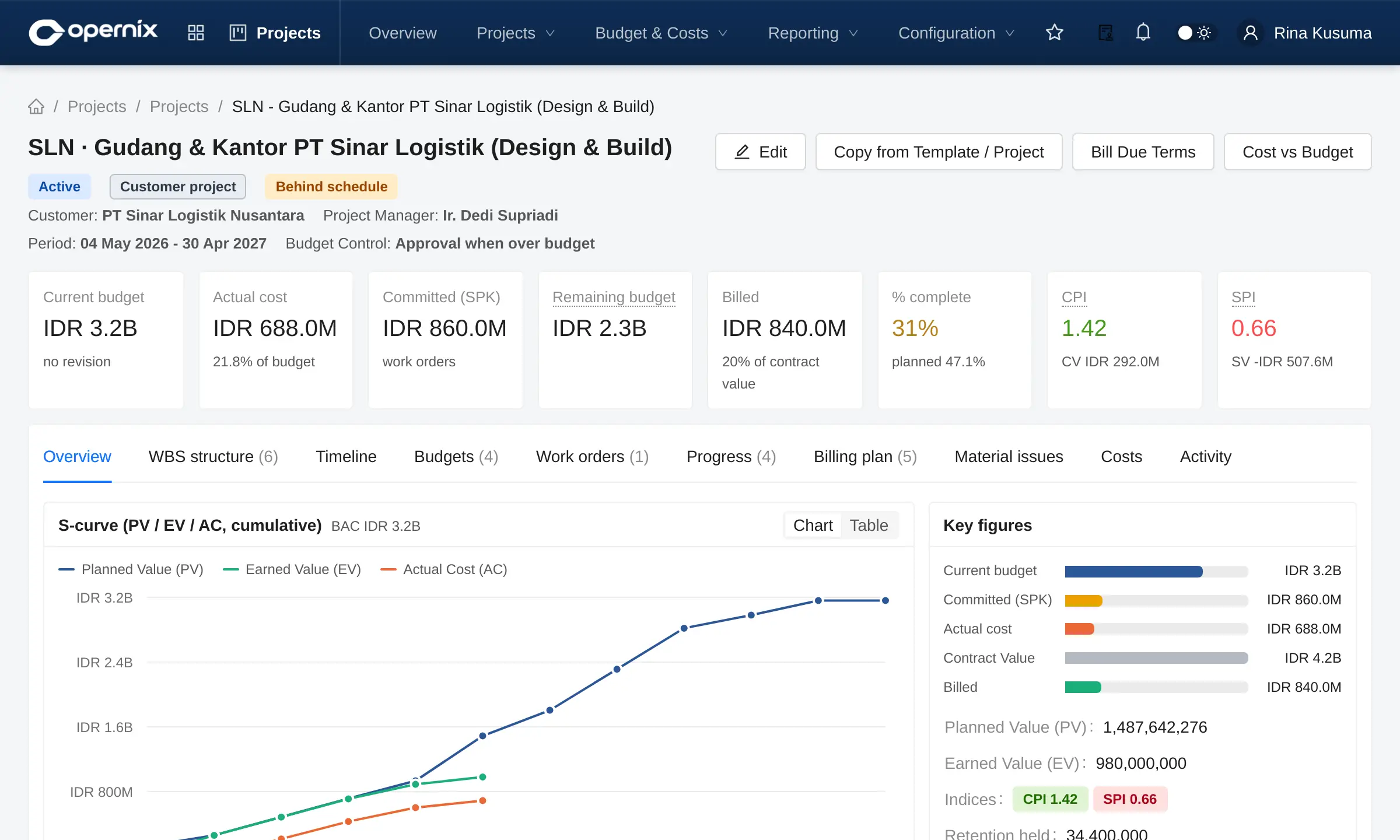
- ProjectsWBS, budgets (RAB), subcontract work orders, progress, billing, S-curve
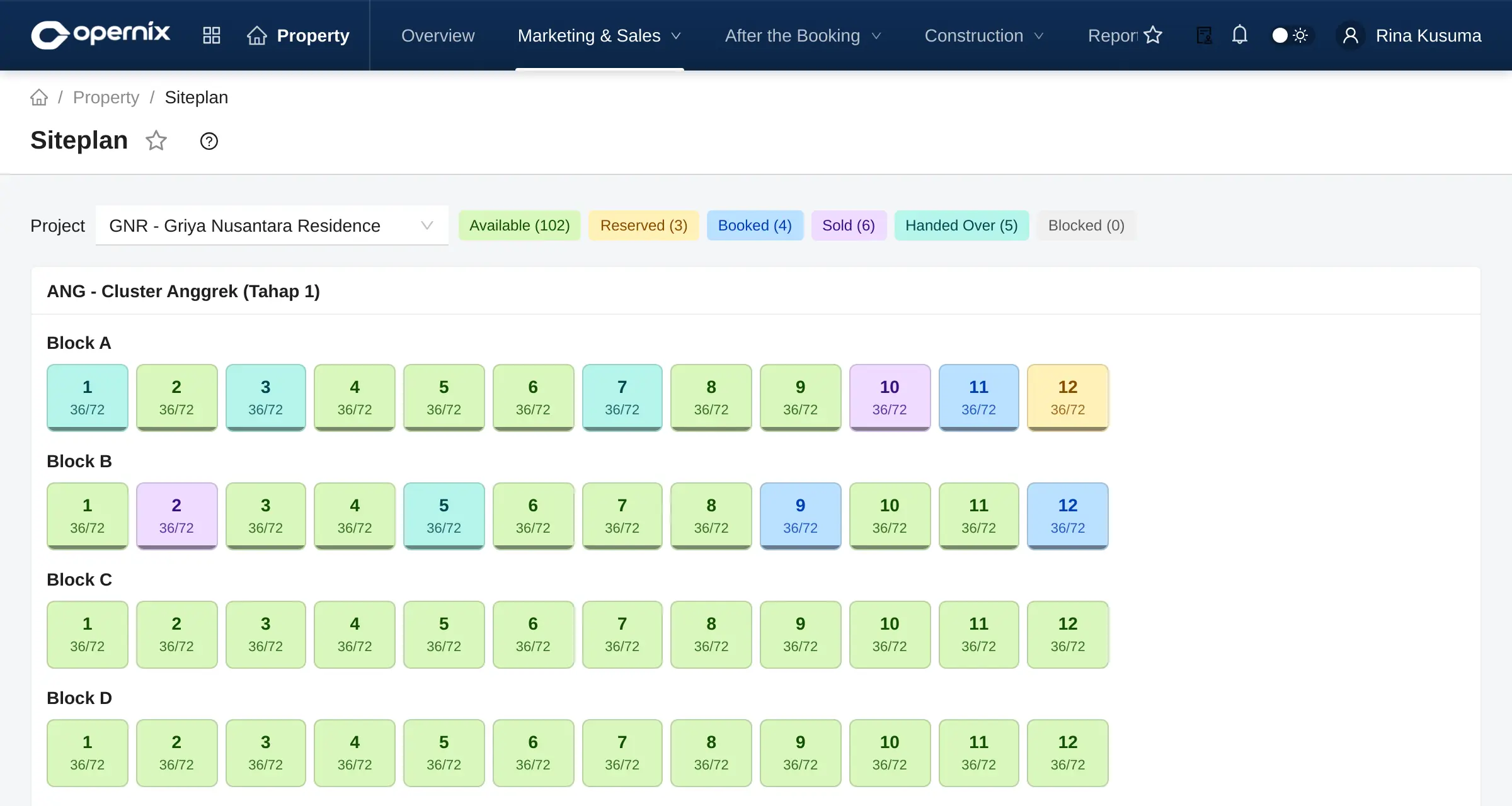
- Property DeveloperUnits & site plan, bookings, mortgages (KPR), handover, final tax, estate fees
- Manufacturing industry packsPlastics & Packaging, Automotive Stamping
Shaped by real-world operations
One ERP core, with the features and terminology your industry works with.
Trading & Distribution
Customer-specific prices, credit control, multi-warehouse stock, down payments and orderly collections.
Learn moreManufacturing
BoMs, MRP, production orders, reporting per shift and machine, QC and actual costs. Includes a plastics & packaging pack.
Learn moreProperty Development
Units and site plan, reservations, booking agreements (SPR), instalment and mortgage schedules, handover, final tax and estate fees.
Learn moreContractors & Projects
WBS, versioned budgets (RAB), subcontractor work orders and progress claims, milestone billing, S-curve and earned value.
Learn moreLocal tax, language and ways of working, built in
Not a translated foreign product. Terminology follows Indonesian accounting practice, and tax rules are part of the everyday document flow.
PPN (VAT) & e-Faktur
A tax invoice (Faktur Pajak) is created when a sales invoice with PPN is confirmed, including down-payment invoices. Input tax invoices are recorded from purchase invoices, summarised per tax period.
Coretax
XML export follows the Coretax import template. The Coretax PJAP add-on submits tax invoices and withholding slips through the PJAP of your choice and tracks their status.
PPh 21 TER & BPJS
Payroll calculates employee income tax (PPh 21) with the TER effective-rate method and the annual recalculation, BPJS health and employment contributions and the THR holiday allowance, then posts the payroll journal.
e-Bupot & income tax recap
Withholding slips (PPh 23 and others) are created from payments. The recap of PPh 21, 22, 23, 4(2), 15 and 26 is compared with the account balances in the ledger.
Rupiah and foreign currency
Books in Rupiah with foreign-currency transactions, the official tax rate (KMK) for foreign-currency tax invoices, and exchange-rate revaluation that reverses automatically.
Indonesian, and English
Interface and documents in standard Indonesian with familiar accounting terms. The interface is also available in English.
Opernix is not a PJAP and is not certified by the DJP (Directorate General of Taxes). Export files follow the DJP template current when the feature was built; validate the results with your tax consultant before using them for filing.
A clear, measurable path to go-live
Implementation follows the documented Memulai Opernix (Getting started) steps of the user guide, at a fixed fee with milestones agreed up front.
Understand your needs
We map your processes and send a written quote with a fixed implementation fee and milestones.
Set up the company
Companies and branches, chart of accounts (an Indonesian template is included), posting groups and document numbering.
Set up users
Roles, access rights per company and an Approval Matrix that matches your organisation.
Migrate data
Master data from Excel templates, then opening balances as of the cut-off date: stock, receivables, payables, assets and the balance sheet.
Go live
We review the go-live checklist together before the first transaction is posted in Opernix.
Android mobile app: attendance, approvals, overview
Opernix Mobile connects to your company’s Opernix server with a QR code and respects the same access rights as the web app. Coming soon to Google Play.
Attendance & self-service
Clock in and out with GPS and a selfie, request leave, permits and overtime, view payslips and the shift schedule.
Approve anywhere
Documents from the approval matrix plus the team’s leave and overtime, with lines, attachments and history. Push notifications when something waits for you.
Owner overview
Sales today and this month, cash and bank, overdue receivables and payables, within your access rights.
Your data in an environment of its own
Every customer runs on a separate application stack and database. No tables are shared with other customers.
Single-tenant
A dedicated application and database for every customer.
Role-based access
Permissions per role per company, down to individual buttons.
Audit trail
Posted documents are never deleted. Cancellations record the reason, the user and the time.
Protected sign-in
Login attempts are rate-limited, and integration credentials are stored encrypted.
Frequently asked questions
Is Opernix cloud-based?
Yes. Opernix is a web-based ERP delivered as SaaS. Users sign in from a browser; there is nothing to install on their computers, and we run the updates.
Is our data separated from other customers?
Yes. Every customer gets its own application stack and database (single-tenant), not a shared database. Within your stack, each company’s data is separate as well, and access is granted per role per company.
Can we run several companies and branches?
Yes. One user can work in several companies and switch between them from the user menu. Every journal entry carries a branch, so the Balance Sheet, Income Statement, Trial Balance and General Ledger can be filtered by branch.
Does Opernix connect to Coretax?
Tax invoices (Faktur Pajak) and withholding slips are created from your transactions and exported as XML in the Coretax import format. With the Coretax PJAP add-on you can submit them and track their status directly from Opernix, through the PJAP (authorised tax application provider) you contract. Opernix itself is not a PJAP and is not certified by the DJP (Directorate General of Taxes), so results should be validated with your tax consultant.
How do we move data from our current system?
Through Data Import with Excel templates: items, customers, suppliers, bank accounts and more. Every file is previewed and validated before it is saved. Opening balances (stock, open invoices, fixed assets, trial balance) are entered as of the agreed cut-off date.
What does it cost?
Pricing depends on the plan, the add-ons and the number of companies. We send a written quote once we understand your requirements. Implementation is delivered at a fixed price with clear milestones. Request a quote.
More questions? See the full FAQ or contact us.
See Opernix working with data like yours
We walk you through the flows that matter to your business, from order to financial statements, and then prepare a written quote.